Automate game testing in C#: drive the game headless, check state, UI and screenshots, replay recorded sessions in CI and prove the simulation repeats.
·onegame team
Automated game testing means a program plays the game for you: it sends input or commands, advances time, and checks what the game did. The checks cover state, what the UI shows, what the screen looks like and whether a run repeats exactly. It does this headless, in CI, on every change. A practical setup has four layers: tests of the rules, scenario tests that drive the real game through its UI, replays of recorded sessions to catch regressions, and screenshot comparisons with a tolerance. This page shows all four, working, in onegame, a C# game engine where each of them is built in. Every command and output below comes from onegame 1.2.0 from NuGet, run on Linux x64 with the .NET 10 SDK.
What to automate in a game, and what to leave to people
Game test automation pays off where a check is exact and the same every time. It pays least where the question is about taste. A useful split:
Layer
What it catches
How it runs
Rule tests
A purchase that costs the wrong amount, a refused action that still changes state
Commands sent to a headless game, then state checked
Scenario tests
A button wired to the wrong command, a label that never updates, a flow that dead-ends
Clicks, keys and controller navigation through the real UI
Replay regression
A code change that alters what a recorded session did, at the exact tick
A recording replayed while comparing a state hash every tick
Screenshot tests
A layout or color change nobody meant to make
Offscreen captures compared with references at a tolerance
Determinism and multiplayer
Clients that drift from the server, a run that doesn’t repeat
The same script run twice, snapshots restored, server and clients compared
People
Whether it is fun, readable and fair
Playtests
The hard part of every automated layer is the same: you need a build of the game that runs without a window, advances time when the test says so, and gives the same result on every run. Without that, automated tests get flaky, and flaky tests get ignored.
How Unity and Unreal approach game test automation
The big engines ship frameworks for this, built around their editors:
Unity Test Framework “enables Unity users to test their code in both Edit Mode and Play Mode, and also on target platforms such as Standalone, Android, iOS”, and it is built on NUnit (Unity Test Framework 1.4 docs).
Unreal Engine’s Automation Test Framework covers unit, feature, smoke, content stress and screenshot comparison tests. It is “built directly in C++”, and its interfaces include an Automation Driver for simulating user input and a Screenshot Comparison Tool (Unreal Engine 5.8 docs). Gauntlet runs whole sessions, “a multiplayer game may require four clients and a server”, and leaves how the game performs its tests to you (Gauntlet docs).
Both give you a test runner. What neither can give you by itself is a game whose simulation is deterministic and driveable by id, so that a test written today still passes, bit for bit, next month. onegame builds that into the engine: the simulation runs in fixed ticks, randomness comes from seeded streams, and the build fails on code that would make a run unrepeatable (see deterministic game simulation in C#). The rest of this page is what that makes possible.
The game under test
A vending machine: two coins buy a can, the can drops half a second later, and buying is refused while a can is dropping, without enough credit, or when the machine is empty. Install the command and create the project:
Terminal.NET 10 SDK
dotnet tool install -g RecursiveAI.OneGame.Cli --version 1.2.0onegame new vendingcd vending
Replace Game.cs with the machine, and delete the scaffold’s ship picture, art/. One entity class holds the synced state, the commands, the simulation step and the view, and the game definition builds the screen with ids that tests use:
Game.csonegame 1.2.0 · .NET 10
using OneGame.Core;using OneGame.Host;using OneGame.UI;namespace Vending;/// <summary>A vending machine: coins go in, a can comes out half a second after you buy it.</summary>[Entity]publicpartialclass Machine : Entity{publicconstint Price = 2; [Synced] publicpartialint Credit { get; privateset; } [Synced] publicpartialint Stock { get; privateset; } [Synced] publicpartialint Sold { get; privateset; } [Synced] publicpartialint Dispensing { get; privateset; } [Command]publicvoid InsertCoin() => Credit++;// Refused (returns false) while a can is dropping, without enough credit, or when empty. [Command]publicbool Buy() {if (Dispensing > 0 || Credit < Price || Stock == 0) {returnfalse; } Credit -= Price; Stock--; Dispensing = 30; // 30 ticks at 60 per secondreturntrue; }protectedoverridevoid OnTick() {if (Dispensing > 0 && --Dispensing == 0) { Sold++; } }// Sim code for setup and fixtures; not a command, so no player can send it.publicvoid Fill(int cans) => Stock = cans; [View]publicstring Status() => Dispensing > 0 ? "Dispensing" : Stock == 0 ? "Sold out" : $"Credit {Credit} of {Price}";}publicsealedclass VendingGame : GameDefinition{publicoverridestring Name => "vending";publicoverridevoid RegisterEntities(EntityRegistry registry) => OneGame.Generated.Vending.EntityTypes.Register(registry);publicoverridevoid Setup(World world) => world.Add(new Machine()).Fill(3);publicoverridevoid DefineFixtures(FixtureSet fixtures) => fixtures .Add("last-can", world => world.Add(new Machine()).Fill(1)) .Add("empty", world => world.Add(new Machine()));publicoverridevoid DefineScreens(ScreenSet screens) => screens.Add("main", game => Ui.Column( Ui.Label(() => MachineOf(game).Status()).Named("status"), Ui.Label(() => $"{MachineOf(game).Stock} left").Named("stock"), Ui.Row( Ui.Button("Insert coin", () => MachineOf(game).Send.InsertCoin()).Named("coin").Padding(Length.Px(8)).Background(Color.Rgb(0x35506E)), Ui.Button("Buy", () => MachineOf(game).Send.Buy()).Named("buy").Padding(Length.Px(8)).Background(Color.Rgb(0x2E6B45))) .Gap(Length.Px(12))) .Padding(Length.Px(24)).Gap(Length.Px(12)).Background(Color.Rgb(0x1C2430)).TextColor(Color.White));privatestatic Machine MachineOf(GameInstance game) => (Machine)game.World.Entities[0];}
Commands (InsertCoin, Buy) are the only way the world changes, and returning false refuses one. OnTick runs 60 times a second of game time. Named("buy") gives the button the id a test clicks. The two fixtures are ready-made worlds a test can start from. More on the model in Getting started.
Scenario tests: drive the real game headless
A scenario is a test written as YAML. It runs against the real game, through the same input path as a player, with no window, display or GPU needed. Delete the scaffold’s ship scenarios and their reference picture (everything in scenarios/) and add scenarios/buy-a-can.yaml:
--no-unit runs only the scenario, without any C# test projects (this page adds one later). The scenario clicks by id, steps frames and checks state and UI text, both between steps and at the end. The first click on Buy is refused, so the machine still has three cans when the coins go in. tick 34 and the hash are the world after the last step. With seed: 1 the hash is the same on every run and every machine, which is what makes a scenario a reliable regression test.
What a failing game test reports
Change the Stock expectation to equals: 3 and run it again:
The report names the line in the YAML file, the expected value and the actual one, and onegame test exits 1. For CI, --json prints the same run as one object, with every step and expectation and the line it came from. Here it is for the second scenario, which starts from a fixture and sends commands directly, the way a network client would:
Steps can also press keys, type text, navigate with a controller (nav: down, nav: activate), write a property directly with set, load a fixture or a saved snapshot mid-run, and check that a sound was played without a sound device. The full list is in Automated game testing with scenarios and Driving a game.
Screenshot tests with a tolerance
A state check can pass while the screen is wrong. A capture expectation renders the frame offscreen and compares it with a reference picture. tolerance: 2 lets each color channel differ by 2, and max-diff: 0.001 lets 0.1% of pixels differ by more than that, which absorbs small differences between GPU drivers.
scenarios/looks.yamlonegame 1.2.0
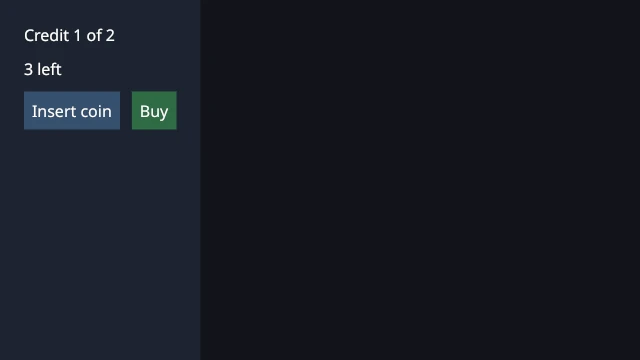
name: looksdescription: The machine after one coin, compared with a reference picture.window: 640x360steps: - click: coin - step: 2expect: - capture: { reference: refs/one-coin.png, size: 640x360, tolerance: 2, max-diff: 0.001 }
The first run has nothing to compare against. It fails and says how to create the reference:
Outputfirst run
FAIL looks (348 ms, tick 2, hash c8a6ceafe0c57ab4) expect capture (line 8): No reference image at /tmp/games/vending/scenarios/refs/one-coin.png. Run with --update-references (or ONEGAME_UPDATE_REFERENCES=1) to create it from the current frame, then look at it. expected: a reference image actual: none0 passed, 1 failed
Terminalonegame 1.2.0
onegame test --no-unit --scenario scenarios/looks.yaml --update-references
Now change the Buy button from green (0x2E6B45) to red (0x8A2E2E) in Game.cs and run the test again. The state hash is unchanged, because the simulation didn’t change, but the picture did:
Outputexit code 1
FAIL looks (375 ms, tick 2, hash c8a6ceafe0c57ab4) expect capture (line 8): The frame differs from refs/one-coin.png: 1765 px (0.766 %) differ by more than 2, max channel delta 92; allowed 0.100 %. Wrote /tmp/games/vending/artifacts/looks.0.actual.png and /tmp/games/vending/artifacts/looks.0.diff.png. expected: within 0.001 of reference actual: 1765 px differ (max delta 92)0 passed, 1 failed
The diff image paints every pixel that differs in bright red over a darkened copy of the frame, so the change is easy to find:
When a change is intended, run with --update-references again. Captures can also be taken outside a test (onegame capture --size 1080p --after 300) or as a sequence of frames. See Screenshot tests for a game.
Record and replay: regression tests from real sessions
A recording holds the starting state and every command. Because the simulation is deterministic, replaying it rebuilds the same world tick by tick, and the replay compares the state hash at each one. Record the scenario while it runs, then replay it:
replay identical: 34 ticks, 4 commands, final hash a70f70b574a99ec3{"ok":true,"identical":true,"ticks":34,"commands":4,"finalHash":"a70f70b574a99ec3","segments":1}
The four commands are the refused Buy, two coins and the purchase. Now change the simulation so a can drops after 20 ticks instead of 30 (Dispensing = 20;), rebuild and replay the same file:
Outputafter the change
replay DIFFERS (segment 0 of 1): Checkpoint at tick 4 (last good 3): 1 part(s) of the state differ.exit 1{"ok":false,"identical":false,"ticks":34,"commands":4,"tick":4,"expected":"6984f168dbdc3452","actual":"2447a25158edbb0e","finalHash":"2447a25158edbb0e","segments":1,"segment":0}
The replay names the first tick that differs, tick 4, when the purchase ran, and exits 1. That makes a recording a regression test for game logic: keep the file, replay it in CI, and any change to what a player would have seen fails at the exact tick. A recording starts from a snapshot, so a bug caught in a long session can be replayed after the fix without replaying the whole session (Record and replay a game).
Game tests in C# with xUnit
When a test needs loops, data or assertions that YAML can’t express, the RecursiveAI.OneGame.Testing package runs the same headless game inside an xUnit test. Put the project in tests/:
The game’s own project must leave tests/ out of its compile, and a global.json selects the test runner that dotnet test --project needs on the .NET 10 SDK:
vending.csprojonegame 1.2.0
<Project Sdk="RecursiveAI.OneGame.Sdk/1.2.0"> <PropertyGroup> <AssemblyName>Vending</AssemblyName> <RootNamespace>Vending</RootNamespace> </PropertyGroup> <ItemGroup><!-- The tests are their own project. --> <Compile Remove="tests/**" /> </ItemGroup></Project>
TestCluster.Start starts one headless game. Its client clicks by id, presses keys, sends commands, steps frames and reads synced properties as text.
cluster.Run runs a scenario file and returns its result, so the YAML tests can run under your C# test runner too.
Determinism.RunTwice runs a scripted player in two fresh games and compares the state hash after every frame. Determinism.Replay records the run and replays it, and SnapshotRestore checks that a snapshot restored halfway lands on the same hashes. A failure names the first frame that differs.
Nothing above needs a display. onegame test exits 0 when everything passed and 1 when a check failed, and a build that fails exits 3, so a CI step can run it directly and archive artifacts/ for the actual and diff pictures when a screenshot test fails. Captures use the GPU when there is one and the software renderer when there isn’t. Make references on the machine that runs the tests, or loosen the tolerance for a different rasterizer.
Multiplayer tests and live control
Two more tools cover what a single process can’t:
Cluster scenarios start a dedicated server and several clients as separate processes over real UDP and WebSocket connections, with simulated latency and loss, then check state on each node and that every replica agrees with the server (Client/server sync with a dedicated server).
Live control over MCP lets a script or an MCP client drive a running Debug build with the same operations scenarios use: read state, click by id, step time, load fixtures, capture frames. That is useful for exploratory testing and for turning a found bug into a scenario (Drive a running game over MCP).
Limits at 1.2.0
Browser tests need an engine checkout.onegame web test runs scenarios in headless Chrome, but the web export it builds on needs an engine checkout at 1.2.0. A game made from the NuGet packages gets this:
Outputonegame web test
error: The web export needs the engine sources (its page and script files), so it runs for a game that sets OneGameRoot to an engine checkout (onegame new --engine <checkout>). A game on the RecursiveAI.OneGame.Sdk package cannot export for the web yet.
Android and iOS exports need a checkout too. Desktop tests, exports and dedicated servers work from the packages.
No physics engine. Collision and movement are your own simulation code, so there is no physics step to test or to make deterministic.
Not an ECS. Entities are classes, and tests address them by type name, numeric id or Type#n.