To create a PDF in C#, add the RecursiveAI.OnePdf.Layout package, describe the document with LayoutDocument.Compose and call Save. OnePdf.Layout is a code-first PDF generator: you build pages from text, rows, columns, tables, images and SVG, and it handles line breaking, page breaks, repeated table headers and page numbers. It writes the file page by page. It is pure C# with no browser and no native binaries, licensed MIT OR Apache-2.0. This page builds a first PDF, a multi-page invoice, an ASP.NET Core download and a PDF/A archive copy. Every sample was compiled and run against OnePDF 1.11.0 on .NET 10.
Create your first PDF
dotnet new console -o PdfCreate
cd PdfCreate
dotnet add package RecursiveAI.OnePdf.Layout --version 1.11.0
using OnePdf.Layout;

LayoutDocument.Compose(doc =>
{
    doc.Title("Hello").Language("en-US");
    doc.Page(page =>
    {
        page.Size(PageSize.Letter);
        page.Margin(72);
        page.Content().Text("Hello, PDF").FontSize(24);
    });
}).Save("hello.pdf");
This writes a one-page US Letter hello.pdf. A few things happen without being asked:
- The text is set in Liberation Sans, which comes with the package, and only the glyphs used are embedded. System fonts are never used unless you add them, so the output is the same on Windows, Linux, macOS and in containers.
- The PDF is tagged: headings, paragraphs, tables and figures are marked for screen readers.
TitleandLanguageset the document’s title and language. - Nothing is laid out until
Save, which writes the file one page at a time, so long documents don’t build up in memory.
Units are points (1/72 inch). PageSize has the usual sizes (Letter, A4 and others), and 10.Mm(), 2.Cm() and 1.Inch() convert.
Generate an invoice with a table that breaks across pages
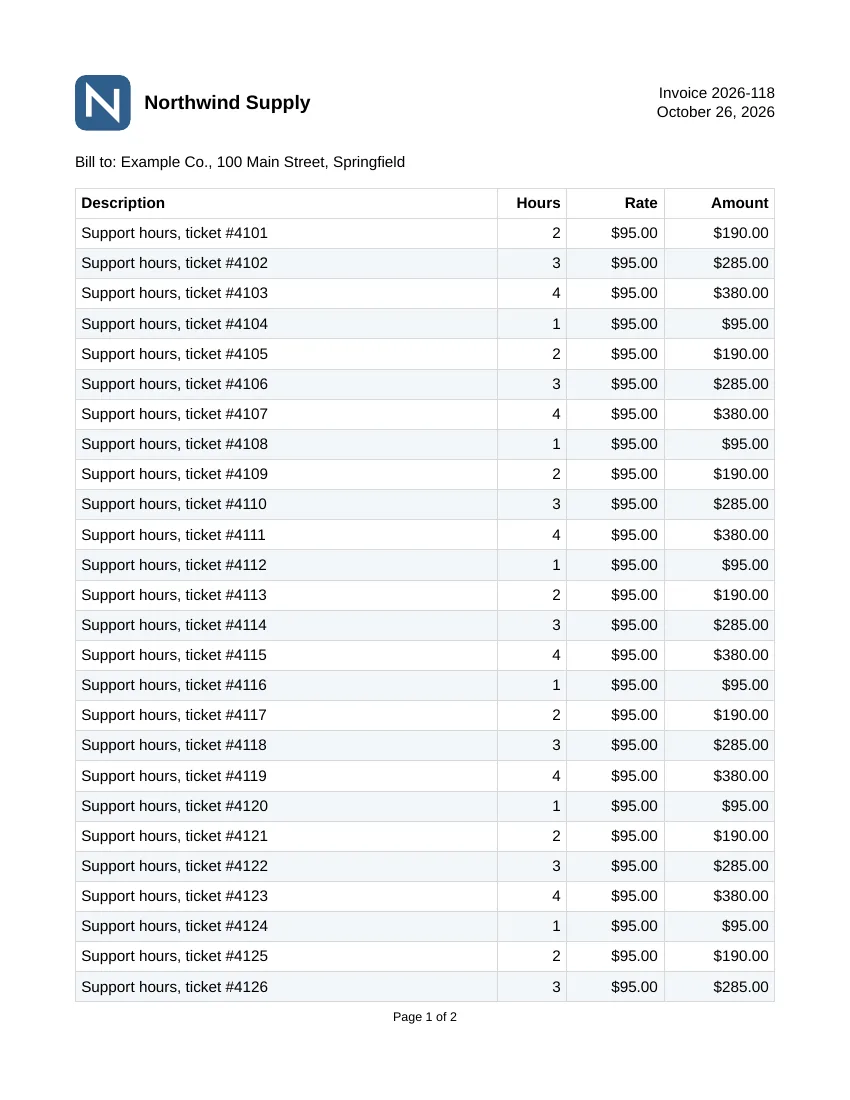
A real document needs a header on every page, a table that continues onto the next page with its header row repeated, and “Page 1 of 2” in the footer. This invoice has 45 lines, a vector logo and a total:
using System.Globalization;
using OnePdf.Layout;

var us = CultureInfo.GetCultureInfo("en-US");

// 45 line items, enough to run onto a second page.
var items = Enumerable.Range(1, 45)
    .Select(i => (Description: $"Support hours, ticket #{4100 + i}", Hours: 1 + i % 4, Rate: 95m))
    .ToList();
decimal total = items.Sum(x => x.Hours * x.Rate);

const string logo = """
    <svg xmlns="http://www.w3.org/2000/svg" viewBox="0 0 40 40">
      <title>Northwind Supply</title>
      <rect width="40" height="40" rx="8" fill="#2F5D8A"/>
      <path d="M10 30 V10 L30 30 V10" stroke="#FFFFFF" stroke-width="4" fill="none"/>
    </svg>
    """;

LayoutDocument.Compose(doc =>
{
    doc.Title("Invoice 2026-118").Language("en-US");
    doc.Page(page =>
    {
        page.Size(PageSize.Letter);
        page.Margin(54);

        page.Header().PaddingBottom(16).Row(row =>
        {
            row.Spacing(10);
            row.AlignMiddle();                             // center the items of the row vertically
            row.ConstantItem(40).Svg(logo);                // vector logo, 40 pt wide
            row.RelativeItem().Text("Northwind Supply").FontSize(14).Bold();
            row.RelativeItem().AlignEnd().Text("Invoice 2026-118\nOctober 26, 2026");
        });

        page.Content().Column(col =>
        {
            col.Spacing(12);
            col.Item().Text("Bill to: Example Co., 100 Main Street, Springfield");
            col.Item().Table(table =>
            {
                table.Columns(c => { c.Relative(1); c.Constant(50); c.Constant(70); c.Constant(80); });
                table.CellPadding(4);
                table.CellBorder(0.5, Colors.LightGrey);
                table.RowBackground(i => i % 2 == 1 ? LayoutColor.FromHex("#F3F6F9") : null);

                table.HeaderRow(r =>                       // repeated at the top of every page
                {
                    r.Cell().Text("Description").Bold();
                    r.Cell().AlignEnd().Text("Hours").Bold();
                    r.Cell().AlignEnd().Text("Rate").Bold();
                    r.Cell().AlignEnd().Text("Amount").Bold();
                });
                foreach (var item in items)
                {
                    table.Row(r =>
                    {
                        r.Cell().Text(item.Description);
                        r.Cell().AlignEnd().Text(item.Hours.ToString(us));
                        r.Cell().AlignEnd().Text(item.Rate.ToString("C", us));
                        r.Cell().AlignEnd().Text((item.Hours * item.Rate).ToString("C", us));
                    });
                }
            });
            col.Item().AlignEnd().Text($"Total due: {total.ToString("C", us)}").FontSize(13).Bold();
        });

        page.Footer().AlignCenter().Text(t =>
        {
            t.FontSize(9);
            t.Span("Page ");
            t.CurrentPageNumber();
            t.Span(" of ");
            t.TotalPages().ReservedDigits(1);              // room for the total, which is known only at the end
        });
    });
}).Save("invoice.pdf");
The result is a two-page US Letter PDF of about 30 KB. The logo and company header sit at the top of both pages, and the table runs from page 1 to page 2 with the “Description, Hours, Rate, Amount” row repeated. The footer reads “Page 1 of 2” and “Page 2 of 2”, and page 2 ends with “Total due: $10,640.00”.
How the pieces fit:
- Slots.
Header,ContentandFooterare slots, and every slot takes one thing:Text,Column,Row,Table,Image,Svgand so on. Decorators such asPaddingBottom,AlignEndorWidthgo in front of it. - Rows and columns.
ConstantItem(points)has a fixed width andRelativeItem()shares what is left. Table columns work the same way withConstantandRelative. - Tables.
HeaderRowrepeats at the top of every page the table reaches.FooterRowrepeats at the bottom, and body rows split between pages.RowBackgroundstripes the rows. See generate a PDF with tables for spans, footers and column-width rules. - SVG.
Svgdraws the logo as vector paths, with its<title>as alternative text. A PNG or JPEG goes in withImage(path)instead. SVG in layout lists what is supported. - Page numbers. The total page count isn’t known until the end, so
ReservedDigitssets aside room for it. Reserve as many digits as the count can have. Extra room shows as a gap before the number. - Vertical alignment. Put
AlignMiddle()on the row, as above, and not on an item. On a slot,AlignMiddlemakes it as tall as the space offered, and in a header that is the whole page.
For content that repeats, implement IComponent and place it with Component(...). Running totals per page (“carried forward”), tables of contents, lists, links and bookmarks are in the layout guide.
Return a PDF from ASP.NET Core
ToBytes() gives you the finished file as a byte array, ready for Results.File. Create the project with dotnet new web and add the package:
using OnePdf.Layout;

var builder = WebApplication.CreateBuilder(args);
var app = builder.Build();

app.MapGet("/invoices/{number}", (string number) =>
{
    byte[] pdf = LayoutDocument.Compose(doc =>
    {
        doc.Title($"Invoice {number}").Language("en-US");
        doc.Page(page =>
        {
            page.Size(PageSize.Letter);
            page.Margin(54);
            page.Content().Text($"Invoice {number}").FontSize(24).Bold();
        });
    }).ToBytes();

    return Results.File(pdf, "application/pdf", $"invoice-{number}.pdf");
});

app.Run();
A request to /invoices/2026-118 returns 200 OK with Content-Type: application/pdf and Content-Disposition: attachment; filename=invoice-2026-118.pdf, and the body is a one-page PDF titled “Invoice 2026-118”. To show the PDF in the browser instead of downloading it, leave out the file name. The same Compose and ToBytes calls work anywhere .NET 10 runs, such as a Blazor Server app or a background service.
Layout objects are independent, so one server can generate many documents at once. In the project’s benchmark, 32 invoices generated concurrently took 9.99 ms in total (see the numbers below).
Fonts, Arabic, Hindi and other scripts
Register your own TrueType or OpenType fonts on doc.Fonts with doc.Fonts.Add(File.ReadAllBytes("Brand-Regular.ttf"), "Brand"), then select them with FontFamily("Brand"). OnePdf.Layout shapes text through the OneFont engine, so kerning and ligatures are applied, and Arabic is joined right to left and Devanagari conjuncts form. Fallback families cover characters your main font lacks. The Arabic and Hindi recipe is a complete program. For hyphenation in 26 language variants, add RecursiveAI.OnePdf.Hyphenation and opt in with Hyphenator(Hyphenators.Auto()).
Save as PDF/A for archiving
The same document can be saved as PDF/A-2b, a profile of PDF for long-term archiving. Save(stream, PdfSaveOptions) lays the document out and then writes it with the conformance options:
using OnePdf;
using OnePdf.Layout;

LayoutDocument report = LayoutDocument.Compose(doc =>
{
    doc.Title("Archive copy").Language("en-US");
    doc.Page(page =>
    {
        page.Size(PageSize.Letter);
        page.Margin(72);
        page.Content().Text("This copy is saved as PDF/A-2b for long-term archiving.");
    });
});

using FileStream file = File.Create("archive.pdf");
report.Save(file, new PdfSaveOptions
{
    PdfA = new PdfAOptions { Part = PdfAPart.Part2, Conformance = PdfAConformance.B },
});
We checked archive.pdf with the veraPDF 1.30.3 validator, and it passes as PDF/A-2b. OnePDF embeds the fonts, writes the XMP metadata and adds an sRGB output intent itself. If a document can’t conform, the save is refused with every violation listed. Because layout output is tagged, the same approach gives PDF/UA for accessibility: see create PDF/UA and create PDF/A, including PDF/A-3 with attached files.
What about HTML to PDF?
OnePDF has no HTML engine, so it doesn’t convert HTML or Razor views to PDF. If your templates are already HTML and CSS, you need a library with a browser engine inside: IronPDF and iText’s pdfHTML add-on are two, both commercial or AGPL (see choosing a C# PDF library for their terms). The code-first approach above needs no browser: page breaks, repeated headers and page numbers are part of the layout model.
OnePdf.Layout, QuestPDF and MigraDoc
OnePdf.Layout uses the same nested-delegate style as QuestPDF. If you know QuestPDF, migrating from QuestPDF maps the calls. The differences that usually decide are the license and the dependencies:
- QuestPDF is free under its Community License for eligible users, including organizations under USD 1 million in annual gross revenue. Others need a paid license from $1,999 (pricing). The 2026.9.1 package carries native Skia and qpdf libraries for eight runtimes.
- MigraDoc 6.5.0 is AGPL or commercial (€750, pricing). Version 6.2.4 and earlier are MIT.
- OnePdf.Layout is MIT OR Apache-2.0 with no native code. It depends on
RecursiveAI.OnePdf,RecursiveAI.OnePdf.FontsandRecursiveAI.OneFont, all from the same project. It targets .NET 10 only and supports NativeAOT.
The project’s published benchmark generated the same documents with OnePdf.Layout and MigraDoc 6.2.4, on an AMD Ryzen 9 7950X3D under Linux with .NET 10.0.13. Times are BenchmarkDotNet means.
| Document | OnePdf.Layout | MigraDoc 6.2.4 |
|---|---|---|
| Invoice, 1 page | 1.01 ms | 1.30 ms |
| Report, 50 pages (tables, images, headers, page X of Y) | 37.1 ms | 175 ms |
| Table, 10,000 rows (about 250 pages, repeated header) | 362 ms | 1,191 ms |
| Book, 500 pages, justified | 317 ms | 496 ms |
| 32 invoices concurrently | 9.99 ms | 51.7 ms |
Published as NativeAOT, OnePDF generates its first invoice in a fresh process in 4 ms with a 12 MiB peak. That matters for serverless functions and command-line tools, where every run is a cold start.
Where next
- Getting started with OnePDF, including reading, editing, forms and signing.
- Generate a PDF with tables, Arabic and Hindi text, PDF/UA.
- The layout guide and layout text for every option.
- Extract text from a PDF in C#, to read documents back.