To extract images from a PDF in C#, open the file with OnePDF and run each page through a small device class that overrides DrawImage. OnePDF calls it once for every image the page draws, with the image’s original bytes, its decoded pixels and its position. A JPEG in a PDF is a complete JPEG file, so you can write its bytes out unchanged. Every other image is raw pixel data with no file format around it, so you encode it yourself, here as PNG with OneImage. This page builds both steps: first a listing of the images on each page, then a program that saves each image once, keeping transparency, JPEG 2000 and CMYK. Both libraries are pure C# with no native binaries. The samples were compiled and run with RecursiveAI.OnePdf 1.11.0 and RecursiveAI.OneImage.Pdf 1.10.2 on .NET 10, on a generated file and on a six-page USGS fact sheet.
How images are stored in a PDF
Knowing the storage explains most of what an extractor has to do:
- JPEG images (the
DCTDecodefilter) are stored as the JPEG file itself. Those bytes are a valid.jpg. - Everything else is a grid of samples, usually Flate-compressed: a PNG you added becomes this, and so do screenshots and charts. There’s no file to copy out, so the samples have to be encoded into PNG or another format.
- JPEG 2000 and JBIG2 (
JPXDecode,JBIG2Decode) are common in scanned and print-ready files. You need a decoder for them. - Transparency is a second image, a soft mask, which can have a different resolution from the image it masks.
- One image can appear many times. A logo stored once can be drawn on every page, and an image can sit inside a form XObject that a page draws.
You could list the image objects in each page’s resources, but interpreting the page is more reliable. The interpreter finds images inside form XObjects and inline images in the content stream, skips content that optional content hides, and tells you where each image is drawn.
Install
dotnet new console -n PdfImages
cd PdfImages
dotnet add package RecursiveAI.OnePdf --version 1.11.0
dotnet add package RecursiveAI.OneImage.Pdf --version 1.10.2
OnePDF targets .NET 10. RecursiveAI.OneImage.Pdf brings in OneImage, which writes the PNG files and decodes JPEG, JPEG 2000 and JBIG2. The listing in the next section needs only RecursiveAI.OnePdf.
List the images on each page
Derive from PdfDevice, which implements every drawing call as a no-op, and override DrawImage. GetData builds the image. With PreferEncoded set, a JPEG isn’t decoded, which keeps a listing fast.
using OnePdf;

using PdfDocument doc = PdfDocument.Open("brochure.pdf");

foreach (PdfPage page in doc.Pages)
{
    var finder = new ImageFinder();
    page.Interpret(finder);   // runs the page's content and calls DrawImage for every image it draws
    foreach (string line in finder.Lines)
        Console.WriteLine($"page {page.Index + 1}: {line}");
}

// A device that ignores everything except images.
sealed class ImageFinder : PdfDevice
{
    public List<string> Lines { get; } = [];

    public override void DrawImage(in PdfImage image, in PdfGraphicsState state)
    {
        PdfImageData? data = image.GetData(new PdfImageOptions { PreferEncoded = true });
        if (data is null) return;   // unusable image dictionary, recorded in doc.Diagnostics
        string name = image.IsInline ? "inline" : image.Name;
        string codec = data.EncodedFilter ?? "samples";
        string alpha = data.Alpha is null ? "" : ", alpha";
        // The image fills the unit square of the CTM. Output space: points, origin at the page's top left.
        PdfMatrix m = state.Ctm;
        double[] xs = [m.E, m.E + m.A, m.E + m.C, m.E + m.A + m.C];
        double[] ys = [m.F, m.F + m.B, m.F + m.D, m.F + m.B + m.D];
        Lines.Add($"{name} {data.Width}x{data.Height} {codec}{alpha}, " +
                  $"drawn {xs.Max() - xs.Min():0}x{ys.Max() - ys.Min():0} pt at ({xs.Min():0}, {ys.Min():0})");
    }
}
The input, brochure.pdf, has two pages: a logo (a PNG with transparency) at the top of both, a JPEG photo on page 1 and a grayscale PNG chart on page 2.
page 1: OpIm1 240x240 samples, alpha, drawn 54x54 pt at (522, 24)
page 1: OpIm2 800x500 DCTDecode, drawn 504x315 pt at (54, 97)
page 2: OpIm1 240x240 samples, alpha, drawn 54x54 pt at (522, 24)
page 2: OpIm2 600x300 samples, drawn 400x200 pt at (54, 192)
OpIm1 and OpIm2 are resource names, which are local to a page, so OpIm2 is the photo on page 1 and the chart on page 2. The logo is the same object on both pages. The PNGs came in as samples, the logo with its alpha channel as a soft mask. The photo kept its JPEG encoding. Positions are in points from the top left of the page, the output space a renderer uses.
Save every image as a file
This version saves each image once. A gray or RGB JPEG with no mask is written byte for byte. Everything else is decoded and written as PNG.
using System.Runtime.InteropServices;
using OneImage;
using OneImage.Pdf;
using OnePdf;

// OnePDF decodes Flate, LZW, CCITT and the other PDF filters itself. These add JPEG, JPEG 2000 and JBIG2.
PdfImageCodecs.Register(PdfImageDecoderRegistry.Default);

string input = args.Length > 0 ? args[0] : "brochure.pdf";
using PdfDocument doc = PdfDocument.Open(input);
var saver = new ImageSaver("images");
foreach (PdfPage page in doc.Pages)
{
    saver.PageNumber = page.Index + 1;
    page.Interpret(saver);
}
Console.WriteLine($"{input}: {saver.Jpegs} saved as .jpg (original bytes), {saver.Pngs} as .png, {saver.Skipped} skipped");

sealed class ImageSaver(string folder) : PdfDevice
{
    readonly HashSet<PdfStream> _seen = [];   // an image drawn on many pages is saved once
    public int PageNumber { get; set; }
    public int Jpegs { get; private set; }
    public int Pngs { get; private set; }
    public int Skipped { get; private set; }

    public override void DrawImage(in PdfImage image, in PdfGraphicsState state)
    {
        if (image.Stream is { } stream && !_seen.Add(stream)) return;
        PdfImageData? data = image.GetData(new PdfImageOptions { PreferEncoded = true });
        if (data is null || data.IsStencil) return;   // a stencil mask is a shape painted in the fill color, not a picture
        Directory.CreateDirectory(folder);
        string path = Path.Combine(folder, $"page{PageNumber}-{Jpegs + Pngs + Skipped + 1}");

        // A gray or RGB JPEG with no mask and no /Decode is a complete JPEG file: save its bytes unchanged.
        if (data.EncodedFilter == "DCTDecode" && data.Alpha is null && data.Semantics.Decode is null
            && data.Semantics.ColorSpace?.ComponentCount is 1 or 3)
        {
            File.WriteAllBytes(path + ".jpg", data.EncodedData.ToArray());
            Jpegs++;
            return;
        }

        data = image.GetData();   // decoded: 8-bit samples in their final color space, mask as alpha
        if (data is not { IsDecoded: true } || data.ColorSpace!.Kind == PdfColorSpaceKind.Lab)
        {
            Skipped++;
            return;
        }
        ToImage(data).Save(path + ".png");
        Pngs++;
    }

    static Image ToImage(PdfImageData data)
    {
        ReadOnlySpan<byte> s = data.Samples.Span;
        int w = data.Width, h = data.Height;
        PdfColorSpace cs = data.ColorSpace!;
        Image img = cs.ComponentCount switch
        {
            1 => Image.FromPixels(MemoryMarshal.Cast<byte, Gray8>(s), w, h),
            3 => Image.FromPixels(MemoryMarshal.Cast<byte, Rgb24>(s), w, h),
            _ => Image.FromPixels(MemoryMarshal.Cast<byte, Cmyk32>(s), w, h),
        };
        if (!cs.IccProfile.IsEmpty)
            img = img.AssignProfile(ColorProfile.FromIcc(cs.IccProfile.Span));   // keep the image's own profile
        if (cs.ComponentCount == 4)
            img = img.ConvertColor(ColorProfile.Srgb);   // PNG holds gray and RGB, not CMYK
        if (data.Alpha is { } alpha)
        {
            GrayAlpha8[] values = [.. alpha.Values.ToArray().Select(a => new GrayAlpha8(0, a))];
            Image mask = Image.FromPixels<GrayAlpha8>(values, alpha.Width, alpha.Height);
            if (alpha.Width != w || alpha.Height != h)
                mask = mask.Resize(w, h, Fit.Stretch);   // a soft mask may have its own resolution
            img = img.AddAlpha().Composite(mask, alpha: AlphaComposition.DestIn);
        }
        return img;
    }
}
brochure.pdf: 1 saved as .jpg (original bytes), 2 as .png, 0 skippedWe checked the three files against the images the brochure was made from. page1-2.jpg has the same SHA-256 hash as the original photo. The two PNGs match the original logo and chart pixel for pixel, including the logo’s transparent background and its semi-transparent center (alpha 0, 160 and 255).
What each branch handles:
- Duplicates.
image.Streamis the image object, so aHashSetof streams saves a logo drawn on 50 pages once. Inline images have no stream and are saved each time they appear. - Original JPEG bytes. The bytes are only a faithful file when the PDF adds nothing on top: no soft mask, no
/Decodearray that changes the colors, and gray or RGB data. A CMYK JPEG can carry an inverting/Decode, so CMYK goes through the decoder instead. - Decoded samples.
GetData()returns 8-bit samples in a final color space, with every PDF rule already applied: indexed images are expanded through their palette, Separation and DeviceN through their tint transform, and/Decodeand color-key masks are applied. Sixteen-bit images keep their high byte. - Color. An ICC-based gray or RGB image keeps its own profile (
AssignProfile), and OneImage writes it into the PNG. CMYK is converted to sRGB, because PNG has no CMYK mode. Lab images are skipped here. - Transparency.
data.Alphais the soft mask, the color-key mask or a JPEG 2000 alpha channel. It is stretched to the image’s size when it has its own resolution, then applied withDestIn. - Stencil masks are one-bit shapes painted in the current fill color, such as the black layer of some scanned pages. They have no colors of their own, so the sample skips them.
A real file: JPEG 2000, CMYK and soft masks
The generated brochure only has the easy cases. USGS Fact Sheet 2016–3020 is a six-page InDesign layout with JPEG 2000 photos and maps in ICC-based CMYK, a Separation (spot color) image, gray JPEGs, and indexed icons with soft masks. The same program, run with the file name as its argument (dotnet run -- fs20163020.pdf):
fs20163020.pdf: 5 saved as .jpg (original bytes), 38 as .png, 0 skippedPoppler’s pdfimages -list reports 43 distinct image objects in the file, plus 91 soft-mask entries, which the program applies as alpha rather than saving separately. All 43 images were saved. The 11 JPEG 2000 images are all ICC-based CMYK. OneImage decoded them and converted them to sRGB. Four of them:
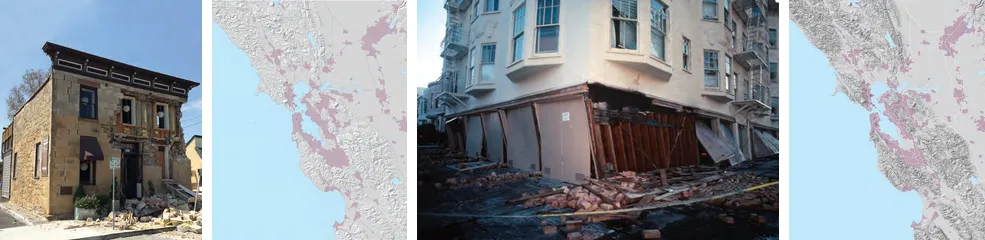
The Separation image comes out as dark gray tones, values 35 to 70 out of 255, the same values poppler extracts for that object.
Without OneImage
OnePDF core decodes the Flate, LZW, run-length, CCITT fax, ASCII85 and ASCIIHex filters. It ships no JPEG, JPEG 2000 or JBIG2 decoder, and its decoder registry starts empty. Without registering any:
- JPEG bytes are still there, in
EncodedData, and are a complete file. - Flate and other non-codec images come back decoded. You need some PNG encoder to write them.
- JPEG 2000 and JBIG2 images come back undecoded (
IsDecodedis false). Register anIPdfImageDecoderforJPXDecodeandJBIG2DecodeinPdfImageDecoderRegistry.Default, or callPdfImageCodecs.RegisterfromRecursiveAI.OneImage.Pdfas above.
Details worth knowing
- Size limits. OnePDF checks an image’s declared size against
PdfLimits(228 pixels by default) before allocating any memory, andGetDatathrowsPdfLimitExceptionabove the limit. That matters when the PDFs come from users. - Passwords. Open an encrypted file with
new PdfOpenOptions { Password = "..." }. The image bytes come back decrypted. - Size on the page. The listing’s
drawn 504x315 ptis the image’s size on the page. Divide its pixel width by the drawn width in inches to get its effective resolution: 800 px across 7 inches is about 114 ppi. - Images of whole pages. To get a picture of a page, with text and vector graphics, render it instead. That is OneImage.Pdf’s main job: see PDF to image in C# on oneimage.dev.
Coming from PdfPig
PdfPig’s page.GetImages() returns the images of a page, and TryGetPng converts the common kinds to PNG. Its wiki says that a JPEG’s RawBytes is a valid JPEG file, and that JBIG2, JPEG 2000 and JPEG decoding need separate filter packages. We ran PdfPig 0.1.16 on the same USGS file. The results, with the code, are in migrating from PdfPig.
Where next
- Extract text from a PDF in C#, in reading order with word positions.
- Add an image or watermark to a PDF in C#, the other direction.
- Redact a PDF in C# to remove an image region for good.
- Getting started with OnePDF and the display-list format, which records every image a page draws.