Install the onescope tool, record a short OnePhysics replay, and open it headless: seek to a step, inspect the world and one body, and capture a frame.
Install
OneScope runs on .NET 10, so you need the .NET 10 SDK or runtime. This guide uses the 1.0.0 tool.
dotnet tool install --global RecursiveAI.OneScope.Tool
onescope --help
In the README’s words: “The shell is a onegame program: it opens a window on Linux, macOS and Windows, or runs headless and renders offscreen.” The physics and navigation modules are bundled, so OnePhysics and OnePath files open with no extra options.
Record a replay
Any OnePhysics or OnePath replay will do. This one comes from a short OnePhysics program: five balls dropped on the ground, recorded for 240 steps. The output below is from a run in /tmp/Bounce.
dotnet new console -o Bounce
cd Bounce
dotnet add package RecursiveAI.OnePhysics --version 1.0.0
using RecursiveAI.OneMath;
using RecursiveAI.OnePhysics;
using RecursiveAI.OnePhysics.Physics2D;

var world = new PhysicsWorld2D();
world.AddBox(new Vector2F(20, 1), at: new Vector2D(0, -1), type: BodyType.Static);

using (var file = File.Create("run.oppr"))
using (world.StartRecording(file))
{
    for (int i = 0; i < 5; i++)
        world.AddCircle(0.5f, at: new Vector2D(i - 2, 4 + i));
    for (int step = 1; step <= 240; step++)
    {
        world.Step(1f / 60);
        if (step == 120) Console.WriteLine($"step 120, hash {world.ComputeHash():x16}");
    }
}
Console.WriteLine($"recorded {world.StepCount} steps to run.oppr");
step 120, hash 96f47843cd094b33
recorded 240 steps to run.oppr
Seek, inspect, capture
In the README’s words: “run operations after opening, print each result as JSON, and exit.” Each --run is one operation, and each result is one line. --headless opens no window and renders offscreen.
onescope open run.oppr --headless --run 'seek {"step":120}' --run 'inspect {"entity":1}' --run 'capture_frame {"path":"frame.png"}'{"source":0,"name":"run.oppr","path":"/tmp/Bounce/run.oppr","module":"onephysics","dimensions":2,"unit":{"name":"m","metres":1},"startStep":0,"steps":240,"axes":[{"id":"time","name":"Time","length":240,"position":0}],"overlays":[{"id":0,"name":"Shapes","defaultOn":true},{"id":1,"name":"Bounds","defaultOn":false},{"id":2,"name":"Contacts","defaultOn":true},{"id":3,"name":"Joints","defaultOn":true},{"id":4,"name":"Centres of mass","defaultOn":false},{"id":5,"name":"Joint limits","defaultOn":true}],"tracks":[{"id":"contact","name":"Contacts begun","kind":"event"},{"id":"sleep","name":"Sleep and wake","kind":"event"},{"id":"joint_break","name":"Joints broken","kind":"event"},{"id":"awake","name":"Awake bodies","kind":"series"},{"id":"contacts","name":"Contact points","kind":"series"}],"pokes":[{"id":"impulse","name":"Impulse","role":"drag","params":[{"name":"target","kind":"entity"},{"name":"impulse","kind":"vector"}]},{"id":"set_velocity","name":"Set velocity","params":[{"name":"target","kind":"entity"},{"name":"velocity","kind":"vector"}]},{"id":"set_position","name":"Set position","role":"drag","params":[{"name":"target","kind":"entity"},{"name":"position","kind":"vector"}]},{"id":"wake","name":"Wake","params":[{"name":"target","kind":"entity"}]}],"label":"run.oppr","step":0,"hash":"5a09a642111ebae2","keyframeInterval":64,"scannedThrough":240,"views":2} {"step":120,"start":0,"steps":240,"sources":[{"source":0,"step":120,"hash":"96f47843cd094b33"}]} {"source":0,"step":120,"entity":1,"kind":"world","name":"World","properties":[{"group":"World","name":"Step","kind":"integer","value":120},{"group":"World","name":"Completed steps","kind":"integer","value":120},{"group":"World","name":"Time step","kind":"number","value":0.01666666753590107},{"group":"World","name":"Hash","kind":"text","value":"96f47843cd094b33"},{"group":"Counters","name":"Awake bodies","kind":"integer","value":5},{"group":"Counters","name":"Awake islands","kind":"integer","value":1},{"group":"Counters","name":"Asleep islands","kind":"integer","value":0},{"group":"Counters","name":"Broadphase pairs","kind":"integer","value":0},{"group":"Counters","name":"Manifolds","kind":"integer","value":5},{"group":"Counters","name":"Contact points","kind":"integer","value":5},{"group":"Counters","name":"Joints","kind":"integer","value":0},{"group":"Counters","name":"Sleep transitions","kind":"integer","value":0},{"group":"Counters","name":"Wake transitions","kind":"integer","value":0}]} {"path":"/tmp/Bounce/artifacts/frame.png","width":1280,"height":720,"scale":1,"sha256":"2a687c60112c6d36122c9ad2746427dffefeb295bd34802f57d7be398a100d87","renderer":"NVIDIA GeForce RTX 4070","target":"shell","step":120,"hashes":["96f47843cd094b33"]}
The hash at step 120, 96f47843cd094b33, is the one the program printed from ComputeHash(): the README says “the world hash it reports is the library’s own.” The frame is the whole shell, drawn offscreen at 1280×720:
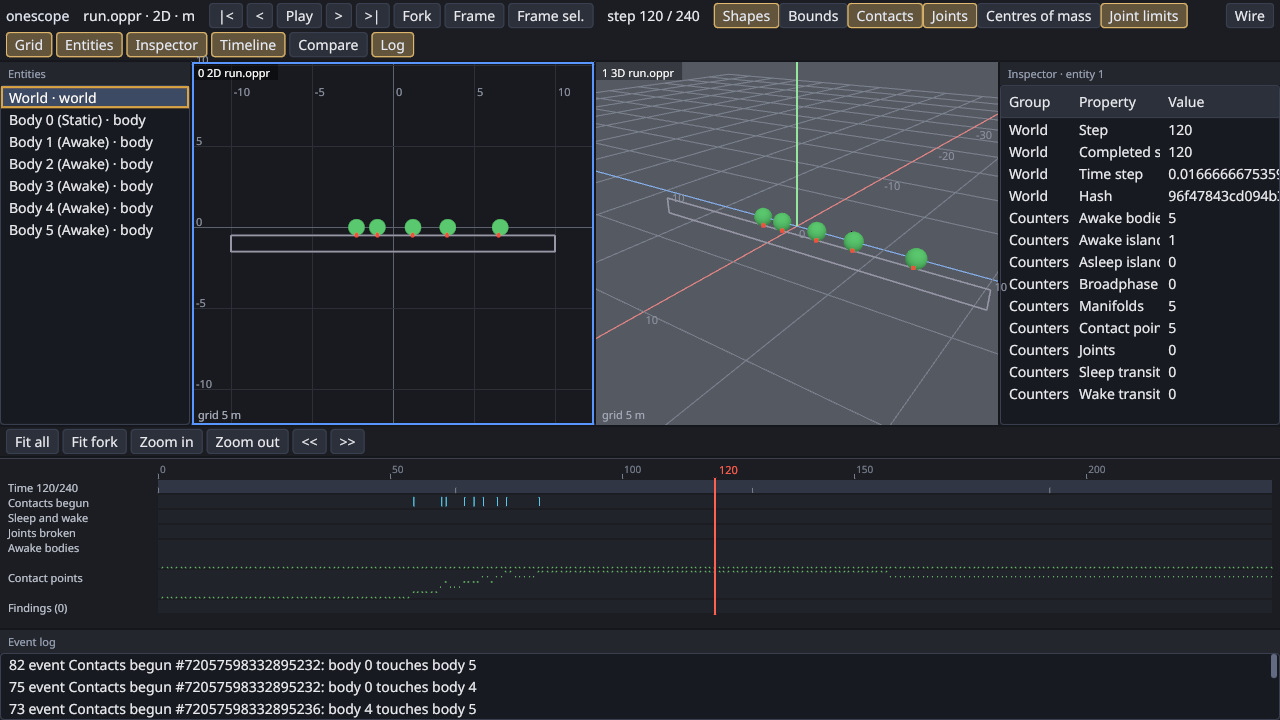
To inspect a body, list the entities first. Entity 1 is the world; the bodies have their own ids. The first line of this run, the open result, is the same as above and left out here.
onescope open run.oppr --headless --run 'seek {"step":120}' --run 'entities {"limit":3}' --run 'inspect {"entity":72057598332895233}'{"source":0,"step":120,"entities":[{"id":1,"parent":null,"kind":"world","name":"World"},{"id":72057598332895232,"parent":1,"kind":"body","name":"Body 0 (Static)"},{"id":72057598332895233,"parent":1,"kind":"body","name":"Body 1 (Awake)"}],"count":7,"truncated":true} {"source":0,"step":120,"entity":72057598332895233,"kind":"body","name":"Body 1 (Awake)","properties":[{"group":"Transform","name":"Position","kind":"vector","value":[-2.2531161,-0.00011538295,0]},{"group":"Transform","name":"Angle","kind":"number","value":0.5006986856460571},{"group":"Motion","name":"Linear velocity","kind":"vector","value":[-0.2670705,0,0]},{"group":"Motion","name":"Angular velocity","kind":"number","value":0.5342166423797607},{"group":"Body","name":"Type","kind":"text","value":"Dynamic"},{"group":"Body","name":"Mass","kind":"number","value":0.7853981852531433},{"group":"Body","name":"Awake","kind":"bool","value":true},{"group":"Solver","name":"Island","kind":"integer","value":0},{"group":"Solver","name":"Sleep time","kind":"number","value":0},{"group":"Solver","name":"Constraints","kind":"integer","value":1},{"group":"Solver","name":"Constraint colours","kind":"integer","value":1048576},{"group":"Solver","name":"External impulse","kind":"vector","value":[0,0,0]}]}
What each part does
openloads the file with the module that owns it and prints what the source declares: its time axis, overlays, timeline tracks and the pokes a fork accepts.seekmoves to a step. Time is a step index; in the README’s words, “Seeking to step k lands on exactly the state that playing straight to k gives, however you got there.”entitiesandinspectread the world at the current step: the entity tree, then one entity’s properties, grouped as the inspector shows them.capture_framewrites a PNG under./artifacts(--artifacts <dir>moves it) and reports its SHA-256, the renderer and the step. Two runs of this guide wrote byte-identical frames; the changelog says headless captures “are byte-identical from run to run on one renderer.”- The replay file is only read. The README: “The original file and the running program are never changed.”
Drive it over the Model Context Protocol
A shell opened with --live serves the same operations on a Unix socket, and other onescope commands drive it:
onescope open run.oppr --headless --live /tmp/onescope.sock &
onescope seek '{"step":120}' --socket /tmp/onescope.sock
{"step":120,"start":0,"steps":240,"sources":[{"source":0,"step":120,"hash":"96f47843cd094b33"}]}onescope mcp --socket <socket> bridges that socket to stdio for an agent. The README’s client configuration:
{ "mcpServers": { "onescope": { "command": "onescope", "args": ["mcp", "--socket", "/tmp/onescope.sock"] } } }Next
- The shell and its operations: every operation, its arguments and its JSON result
- Time, history and forks
- Live attach: watch a running program that calls the probe
- Writing a module: add your own library