A C# game reaches the Steam Deck in one of two ways: as a Windows build that Steam runs through Proton, or as a native Linux build. A native build starts faster, needs no translation layer and is what you test on your own Linux machine. The catch is the C library. Steam runs native Linux games inside a container runtime, and a program linked on a current Linux distribution asks for a newer glibc than that runtime has, so it doesn’t start. This page builds a native Linux program from C# with onegame that avoids that, checks the glibc it needs with objdump, and runs it inside Valve’s own runtime image, headless and in a window. Every command and output below was run with onegame 1.5.1 on Ubuntu 26.04 (glibc 2.43) with the .NET 10 SDK.
Why a native Linux build fails on the Deck
Steam doesn’t run a native Linux game directly on the host. Valve’s guide for developers says so plainly: “There is no option for running directly on the host system with no compatibility tool” (Steam Linux Runtime, guide for game developers). A game chooses a runtime in the Steamworks settings. Steam Runtime 3, “sniper”, is based on Debian 11, whose C library is glibc 2.31. Valve now recommends Steam Runtime 4 for new titles; a program that needs no more than glibc 2.31 suits both, because glibc runs programs built against older versions.
glibc versions its symbols. A program linked on Ubuntu 26.04 records that it needs, say, GLIBC_2.38, and the loader refuses to start it where only 2.31 exists:
/game/Starcatch: /lib/x86_64-linux-gnu/libm.so.6: version `GLIBC_2.38' not found (required by /game/Starcatch)
/game/Starcatch: /lib/x86_64-linux-gnu/libc.so.6: version `GLIBC_2.34' not found (required by /game/Starcatch)
/game/Starcatch: /lib/x86_64-linux-gnu/libc.so.6: version `GLIBC_2.32' not found (required by /game/Starcatch)
The usual fixes are to build inside Valve’s SDK container or on an old distribution. For a .NET game there is a third piece: NativeAOT, which compiles the game to one native program with no .NET runtime to install, links with the system C toolchain, and so inherits whatever glibc that toolchain links against.
Export a Linux build that needs glibc 2.31 at most
This uses the star-catching game from C# game development without an editor. Any onegame game works the same way. From 1.5.1, a Linux NativeAOT export links against glibc 2.31 by default, on any Linux host:
onegame export --target linuxexported starcatch 1.0.0 for linux-x64 (nativeaot): 7 files, 7805 KiB folder: /tmp/games/starcatch/export/starcatch-1.0.0-linux-x64 archive: /tmp/games/starcatch/export/starcatch-1.0.0-linux-x64.tar.gz (3773 KiB)
The first export downloads the build-time C library files (Debian 11’s libc6, libc6-dev and libgcc-s1, pinned by SHA-256) into ~/.cache/onegame/sysroot/, and the linker takes symbol versions from them. Nothing from them is copied into the game. Then the export reads the version names the program asks for, and fails if any is newer than 2.31.
Check the glibc it needs
Don’t take the export’s word for it. objdump -T lists the program’s dynamic symbols with the version each one needs:
objdump -T export/starcatch-1.0.0-linux-x64/Starcatch | grep -o 'GLIBC_[0-9.]*' | sort -Vu | tail -3GLIBC_2.17 GLIBC_2.27 GLIBC_2.29
The newest version the program needs is 2.29, under sniper’s 2.31. The same game exported with --host-glibc, which links against this machine’s own glibc 2.43, needs GLIBC_2.38: that build produced the errors at the top of this page.
If something forces a newer symbol in, for instance a sysroot of your own passed with --sysroot, the export stops instead of shipping a program that won’t start:
error: Starcatch needs glibc 2.38, newer than 2.31 in Steam's Linux runtime (and so on the Steam Deck). Export without --sysroot (the default links against glibc 2.31), or pass --host-glibc if the program only has to run on systems like this one. See docs/exporting.md.With --json the code is glibc_too_new, for CI to check.
Run it in Valve’s runtime image
The engine’s repository has tools/steamrt.sh, which downloads Valve’s public sniper runtime image (pinned by SHA-256, no Steam account) and runs a folder inside it with bubblewrap: the game read-only at /game, no network. The image’s C library is GNU C Library (Debian GLIBC 2.31-13+deb11u14), build 3.0.20261021.266025. The script is a repository tool, not part of the NuGet packages; its run step needs only the script, not an engine checkout:
steamrt.sh fetch
steamrt.sh run export/starcatch-1.0.0-linux-x64 /game/run.sh --headless --frames 1800 --seed 1 --json
{"ok":true,"game":"starcatch","headless":true,"frames":1800,"tick":1800,"hash":"c3f88ebbec2ae168","width":1280,"height":720}That is the same hash as onegame run --headless --frames 1800 --seed 1 --json on the development machine: the program started, ran the whole simulation and ended on the same state. The dedicated server export links the same way, and ran in the same image too.
A headless run proves the program loads and simulates, not that it draws. --x11 --nvidia passes an X display and the host’s NVIDIA driver into the sandbox, as Steam supplies the driver on a real system. Started against an Xvfb display on an RTX 4070:
DISPLAY=:97 steamrt.sh run --x11 --nvidia export/starcatch-1.0.0-linux-x64 /game/run.sh --seed 1 --frames 200 --json{"ok":true,"game":"starcatch","headless":false,"frames":200,"tick":243,"hash":"87b416d698fed021","width":1280,"height":720}A windowed run is paced by the clock, so it ran 243 ticks in 200 frames. run.sh --headless --seed 1 --frames 243 --json prints the same hash, 87b416d698fed021. The window inside the runtime:
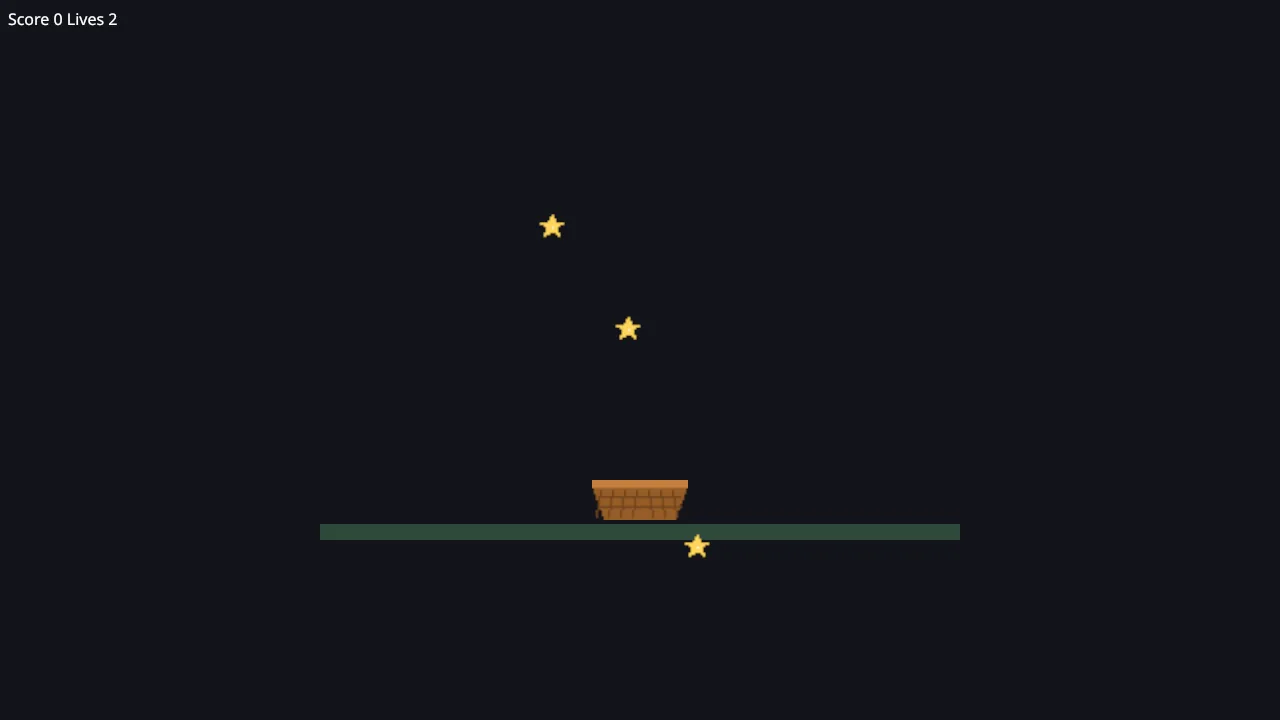
Two things matter if you run this yourself. Unset WAYLAND_DISPLAY when you pass an X display, or the game tries Wayland first and stops with “Could not connect to a Wayland compositor”. And only the NVIDIA driver loads in the image this way: a Mesa driver from a current host needs a newer glibc than 2.31.
What this does and doesn’t prove
The runtime image is the environment Steam starts a sniper game in, so a passing run there is the check that matters before upload. It isn’t a run on the device: the Deck’s AMD graphics driver, its screen and its controls weren’t tested for this page. The engine’s device notes list what was checked on a Deck, and Steam and the Steam Deck has the Steamworks binding.
Ship it with Steam
--steam copies Valve’s Steamworks library next to the program. You supply it from your own Steamworks SDK; without it the export stops with steam_redist_missing:
ONEGAME_STEAM_SDK=~/steamworks/sdk onegame export --target linux --steamThat command wasn’t run for this page, because the Steamworks SDK is Valve’s and needs your account; the error without it was. In Steamworks, set the Linux launch option to run.sh and pick the Linux runtime under Installation → Linux Runtime. Details are in Ship a game for Steam and the Steam Deck.
Make it play well on a Deck
- Controller first. Give every screen a starting focus and make every action reachable with the d-pad and confirm: see controller and keyboard navigation. Input actions answer the gamepad and Steam Input from the same declaration.
- The screen.
onegame capture --size deckdraws a frame at the Deck’s 1280 × 800, for a screenshot test at that size. - Detecting a Deck.
store.Environment.IsHandheldwraps Steamworks’IsSteamRunningOnSteamDeck, which Valve marks deprecated as of SDK 1.65. The engine’s notes recommend combining it with other signals, such as/etc/os-releaseand the DMI product name, and using the answer only for defaults such as glyphs and UI scale.
Limits at 1.5.1
- Linux exports are x86-64 only, which is what the Deck runs.
- The first export needs a network to fetch the build files; offline it fails with
sysroot_unavailable. - Switching an export to
--host-glibcwith no source change reused the program linked against 2.31. Change a file, or deleteobj/, before comparing the two. - Web, Android and iOS exports need an engine checkout at 1.5.1. Desktop exports and dedicated servers work from the NuGet packages.
Every option is in Exporting.