A PDFsharp program usually has two parts, and each has its own target in OnePDF. MigraDoc documents, built from sections, paragraphs, tables and footers, become LayoutDocument.Compose in the RecursiveAI.OnePdf.Layout package. PDFsharp’s page work (PdfReader.Open, importing pages and drawing with XGraphics) moves to PdfDocument.Open and page.BeginContent() in the core package. The common reason to move now is the license: from 6.5.0, PDFsharp and MigraDoc are AGPL-3.0 or a commercial license (see PDFsharp license), while OnePDF is MIT OR Apache-2.0. Moving also gets you text extraction, form filling and tagged PDF output by default. This guide ports a MigraDoc document and a PDFsharp drawing job side by side. Both were compiled and run with PDFsharp and PDFsharp-MigraDoc 6.5.0, the current release on NuGet (AGPL license loaded for the run), and OnePDF 1.11.0, on .NET 10 under Linux.
Check these first
- .NET version. OnePDF targets .NET 10 only. PDFsharp 6.5.0 also targets .NET Standard 2.0, .NET 8 and .NET 9 (NuGet). Code that must stay on .NET Framework can’t move.
- RTF and charts. MigraDoc also renders to RTF and draws business charts (features). OnePdf.Layout writes PDF only, and has no chart element: draw a chart on a
Canvas, or place it as SVG or an image. - Coordinates.
XGraphicsmeasures from the top left, with y growing down. OnePDF’s content builder uses PDF coordinates, from the bottom left with y growing up. The drawing sample below shows the conversion. - Page numbers start at 0 in both:
document.Pages[0]anddoc.Pages[0]are the first page.
dotnet remove package PDFsharp-MigraDoc
dotnet add package RecursiveAI.OnePdf --version 1.11.0
dotnet add package RecursiveAI.OnePdf.Layout --version 1.11.0
Remove the PDFsharp package as well if that’s what you reference. Add RecursiveAI.OnePdf.Layout only if you generate documents.
A MigraDoc document in OnePdf.Layout
A two-page log with a heading, a table whose header row repeats on every page, and a “Page X of Y” footer, written from MigraDoc’s documentation on tables, headers and footers, fields and rendering. On Linux, PDFsharp’s Core build needs a font resolver: its font resolving page says the platform resolver “throws an exception by default” there. This one serves two Liberation Sans files from the program’s folder:
using MigraDoc.DocumentObjectModel;
using MigraDoc.Rendering;
using PdfSharp;
using PdfSharp.Fonts;

PdfSharpLicense.SetAgplLicense();                       // required from 6.5.0, or LoadLicense(yourKey)
GlobalFontSettings.FontResolver = new FileFontResolver(); // the Core build has no fonts of its own

var document = new Document();
document.Info.Title = "Harbor trial log";
document.Styles[StyleNames.Normal]!.Font.Name = "Liberation Sans";
Style h1 = document.Styles[StyleNames.Heading1]!;
h1.Font.Size = 16;
h1.Font.Bold = true;

Section section = document.AddSection();
section.PageSetup.PageFormat = PageFormat.Letter;     // the default page setup is A4

section.AddParagraph("Harbor trial log", StyleNames.Heading1);
section.AddParagraph("Daily catch of the north quay crews.");

var table = section.AddTable();
table.Borders.Visible = true;
table.AddColumn(Unit.FromPoint(120));
table.AddColumn(Unit.FromPoint(120));
var header = table.AddRow();
header.HeadingFormat = true;                              // repeated on every page
header.Format.Font.Bold = true;
header[0].AddParagraph("Day");
header[1].AddParagraph("Catch (kg)");
for (int day = 1; day <= 60; day++)
{
    var row = table.AddRow();
    row[0].AddParagraph($"Day {day}");
    row[1].AddParagraph($"{800 + day * 37 % 400:N0}");
}

Paragraph footer = section.Footers.Primary.AddParagraph();
footer.Format.Alignment = ParagraphAlignment.Center;
footer.AddText("Page ");
footer.AddPageField();
footer.AddText(" of ");
footer.AddNumPagesField();

var renderer = new PdfDocumentRenderer { Document = document };
renderer.RenderDocument();
Console.WriteLine($"{renderer.PdfDocument.PageCount} pages");
renderer.PdfDocument.Save("log-migradoc.pdf");

// Maps every request to the two Liberation Sans files next to the program.
sealed class FileFontResolver : IFontResolver
{
    public FontResolverInfo? ResolveTypeface(string familyName, bool bold, bool italic) =>
        new(bold ? "LiberationSans-Bold" : "LiberationSans-Regular");

    public byte[]? GetFont(string faceName) => File.ReadAllBytes(faceName + ".ttf");
}
2 pagesOne detail from writing it: setting PageFormat on a clone of DefaultPageSetup had no effect, because the clone carries an explicit A4 width and height. MigraDoc’s page setup page warns about this and points to ResetPageSize. The same document in OnePdf.Layout:
using OnePdf.Layout;

using var pdf = LayoutDocument.Compose(doc =>
{
    doc.Title("Harbor trial log").Language("en-US");
    doc.Page(page =>
    {
        page.Size(PageSize.Letter);
        page.Margin(72);
        page.Content().Column(col =>
        {
            col.Spacing(6);
            col.Item().Heading(1).Text("Harbor trial log").FontSize(16).Bold();
            col.Item().Text("Daily catch of the north quay crews.");
            col.Item().Table(table =>
            {
                table.Columns(c => { c.Constant(120); c.Constant(120); });
                table.CellPadding(2);
                table.CellBorder(0.5, Colors.Black);
                table.HeaderRow(r => { r.Cell().Text("Day").Bold(); r.Cell().Text("Catch (kg)").Bold(); });   // repeated on every page
                for (int day = 1; day <= 60; day++)
                    table.Row(r => { r.Cell().Text($"Day {day}"); r.Cell().Text($"{800 + day * 37 % 400:N0}"); });
            });
        });
        page.Footer().AlignCenter().Text(t =>
        {
            t.Span("Page ");
            t.CurrentPageNumber();
            t.Span(" of ");
            t.TotalPages().ReservedDigits(1);
        });
    });
}).ToPdfDocument();
pdf.Save("log-onepdf.pdf");
Console.WriteLine($"{pdf.PageCount} pages");
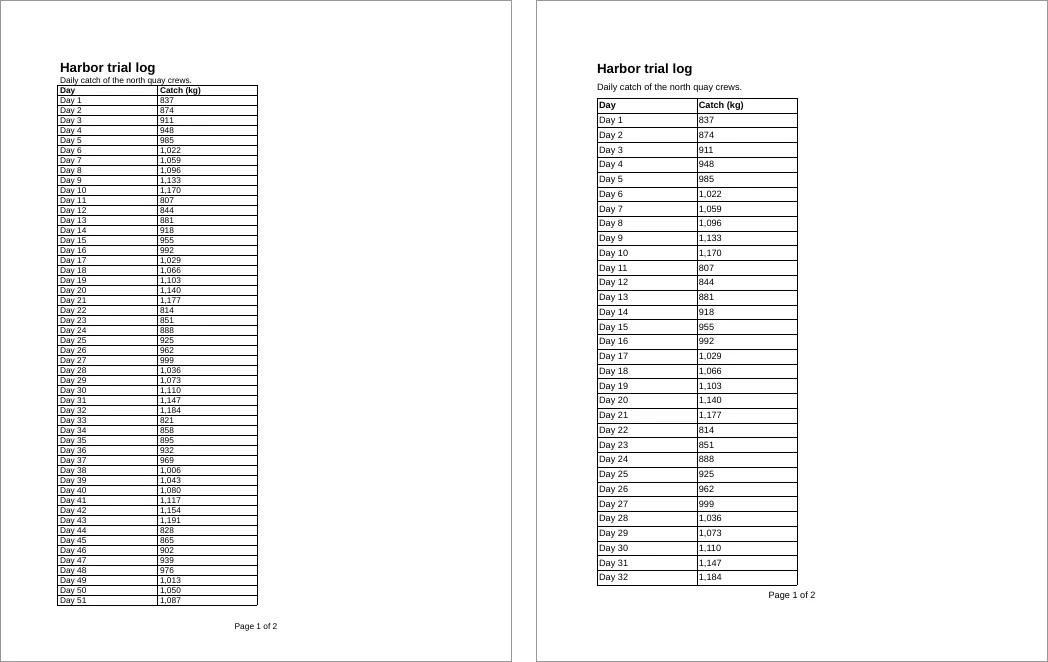
2 pagesPage 1 of each, MigraDoc on the left and OnePdf.Layout on the right. Each uses its own default text size and cell padding, so the pages break at different rows:
How the MigraDoc pieces map:
| MigraDoc 6.5.0 | OnePdf.Layout 1.11.0 |
|---|---|
new Document(), document.Info.Title | LayoutDocument.Compose(doc => ...), doc.Title(...) |
document.AddSection(), section.PageSetup | doc.Page(page => ...) with page.Size, page.Margin, page.Landscape() |
section.AddParagraph(text, StyleNames.Heading1) | col.Item().Heading(1).Text(text), a tagged H1 |
Styles (document.Styles[...]) | Format calls on the text (FontSize, Bold, FontColor), or a C# method or IComponent you reuse |
table.AddColumn(width) | table.Columns(c => c.Constant(width)), or c.Relative(n) |
row.HeadingFormat = true | table.HeaderRow(...) |
cell.MergeRight, cell.MergeDown | cell.Span(columns, rows) |
section.Footers.Primary, Headers.FirstPage | page.Footer(), page.FirstPageHeader() |
AddPageField(), AddNumPagesField() | t.CurrentPageNumber(), t.TotalPages() |
PdfDocumentRenderer.RenderDocument(), Save | .Save(path), or .ToPdfDocument() to keep editing |
IFontResolver | Not needed: Liberation Sans from RecursiveAI.OnePdf.Fonts by default, doc.Fonts.Add(bytes, family) for others |
The outputs differ in two ways you can check with pdfinfo and pdffonts. The OnePdf.Layout file is tagged (“Tagged: yes”): the heading, paragraph and table cells are in a structure tree, and the footer is marked as an artifact, the structure that PDF/UA builds on. Both embed subsets of Liberation Sans. The OnePdf.Layout file is 21,950 bytes and the MigraDoc file 34,610.
The OnePDF repository publishes a layout benchmark against MigraDoc 6.2.4. A 50-page report with tables, images, headers and “page X of Y” took 37.1 ms against 175 ms, with 30.8 MB allocated against 188 MB (BenchmarkDotNet means, AMD Ryzen 9 7950X3D, Linux, .NET 10.0.13). The same benchmark notes that MigraDoc draws Arabic and Devanagari characters unshaped. OnePdf.Layout shapes them: see Arabic and Hindi text in a C# PDF.
Draw on existing pages
The PDFsharp side opens a file in modify mode and draws on each page with XGraphics, as in its bitmap images and first PDF pages. A logo at the top right and a line of text in the top margin:
using PdfSharp;
using PdfSharp.Drawing;
using PdfSharp.Fonts;
using PdfSharp.Pdf;
using PdfSharp.Pdf.IO;

PdfSharpLicense.SetAgplLicense();
GlobalFontSettings.FontResolver = new FileFontResolver();

PdfDocument document = PdfReader.Open("chapter-1.pdf", PdfDocumentOpenMode.Modify);
var font = new XFont("Liberation Sans", 9, XFontStyleEx.Bold);
XImage logo = XImage.FromFile("logo.png");
foreach (PdfPage page in document.Pages)
{
    using XGraphics gfx = XGraphics.FromPdfPage(page);    // draws over the page's content
    double width = page.Width.Point;
    gfx.DrawImage(logo, width - 108, 18, 36, 36);          // XGraphics: origin top left, y grows down
    gfx.DrawString("DRAFT: NOT FOR CIRCULATION", font, XBrushes.DarkRed, 72, 40);
}
Console.WriteLine($"stamped {document.PageCount} pages");
document.Save("chapter-1-pdfsharp.pdf");

sealed class FileFontResolver : IFontResolver
{
    public FontResolverInfo? ResolveTypeface(string familyName, bool bold, bool italic) =>
        new(bold ? "LiberationSans-Bold" : "LiberationSans-Regular");

    public byte[]? GetFont(string faceName) => File.ReadAllBytes(faceName + ".ttf");
}
stamped 2 pagesOnePDF opens the file for editing, and each page gives a content builder that adds to the page without touching what is already there:
using OnePdf;

using PdfDocument doc = PdfDocument.Open("chapter-1.pdf", new PdfOpenOptions { AllowEditing = true });
PdfCreatedFont font = doc.AddFont(File.ReadAllBytes("LiberationSans-Bold.ttf"));   // embedded as a subset
PdfCreatedImage logo = doc.AddPngImage(File.ReadAllBytes("logo.png"));            // alpha kept as a soft mask
foreach (PdfPage page in doc.Pages)
{
    double height = page.CropBox.Height, width = page.CropBox.Width;
    using PdfPageContentBuilder b = page.BeginContent();   // drawn over the page's content
    b.DrawImage(logo, width - 108, height - 18 - 36, 36, 36); // PDF space: origin bottom left, y grows up
    b.SetFillRgb(0.545, 0, 0);                              // XColors.DarkRed is #8B0000
    b.SetFont(font, 9);
    b.DrawText("DRAFT: NOT FOR CIRCULATION", 72, height - 40);
    b.Commit();
}
doc.Save("chapter-1-onepdf.pdf");
Console.WriteLine($"stamped {doc.PageCount} pages");
stamped 2 pagesThe y values are the only real change: a box that starts 18 points from the top in XGraphics has its bottom edge at height - 18 - 36 in PDF space, and text placed at 40 from the top sits at height - 40. Rendered with pdftoppm, the first pages of the two files differ only by a few pixels along the stamped line of text. The builder also does paths, colors, transparency, clipping and text boxes that wrap, and doc.AddTextStamp and doc.AddImageStamp put the same mark on many pages in one call (see add an image or watermark).
For the rest of PDFsharp’s page API (open modes, importing, removing and rotating pages, metadata, encryption) the PDFsharp migration map in the docs lists the OnePDF call for each.
What PDFsharp’s docs describe as missing or early
According to empira’s own pages, read on 27 October 2026:
- Text extraction. The FAQ (version 6.2.0): “There are no high-level functions that return words, paragraphs, or whole pages.” OnePDF extracts text in reading order with word positions (extract text).
- Forms. The FAQ says AcroForm support is “limited”. OnePDF fills, validates and flattens fields (fill a form, flatten).
- PDF/A. The archiving page (version 6.2.0) says “PDF/A support is under construction” and “in a very early state”, that a specific PDF/A level can’t be set, and that PDFsharp can’t check whether a file conforms. OnePDF writes PDF/A-2b, 2u, 3b and 3u (and 2a and 3a for tagged documents), and refuses to save with the violations listed (create PDF/A).
- Accessibility. PDFsharp builds PDF/UA with a
UAManagerand aStructureBuilderaround your drawing calls (accessibility). OnePdf.Layout tags as it lays out, and saves PDF/UA-1 or PDF/UA-2 (PDF/UA in C#). - Signatures. Both sign: PDFsharp has signed with CMS since 6.2.0, time-stamps included (digital signatures). OnePDF also verifies signatures and their certificate chains (sign a PDF).
OnePDF also repairs damaged files when it opens them (repair rules), redacts content so it can’t be recovered, and extracts images.
What has no equivalent in OnePDF
- RTF output and MigraDoc charts, as above.
- Printing. MigraDoc lists printer output among its output formats. OnePDF doesn’t print or rasterize pages. For page images in .NET, see PDF to image in C# on oneimage.dev.
- HTML to PDF. Neither library has it. PDFsharp’s FAQ points to a third-party package, and OnePDF has no HTML engine.
- .NET Framework and .NET Standard targets.
Where next
- PDFsharp license: what changed in 6.5.0, with the PdfSharpLicenseException fix.
- Create a PDF in C#, a full OnePdf.Layout tutorial with an invoice.
- The layout guide and the PDFsharp migration map in the docs.
- Choosing a C# PDF library.